Robo Alert

WhatsApp automation platform

Every WhatsApp message your business sends, automated

Order and delivery alerts for your store. A shared inbox, an AI agent that answers and qualifies leads, automation flows and bulk campaigns for your team. Connect your number with a QR scan or the official Meta WhatsApp API.

  • Free plans to start
  • Shopify & WooCommerce
  • QR scan or official API
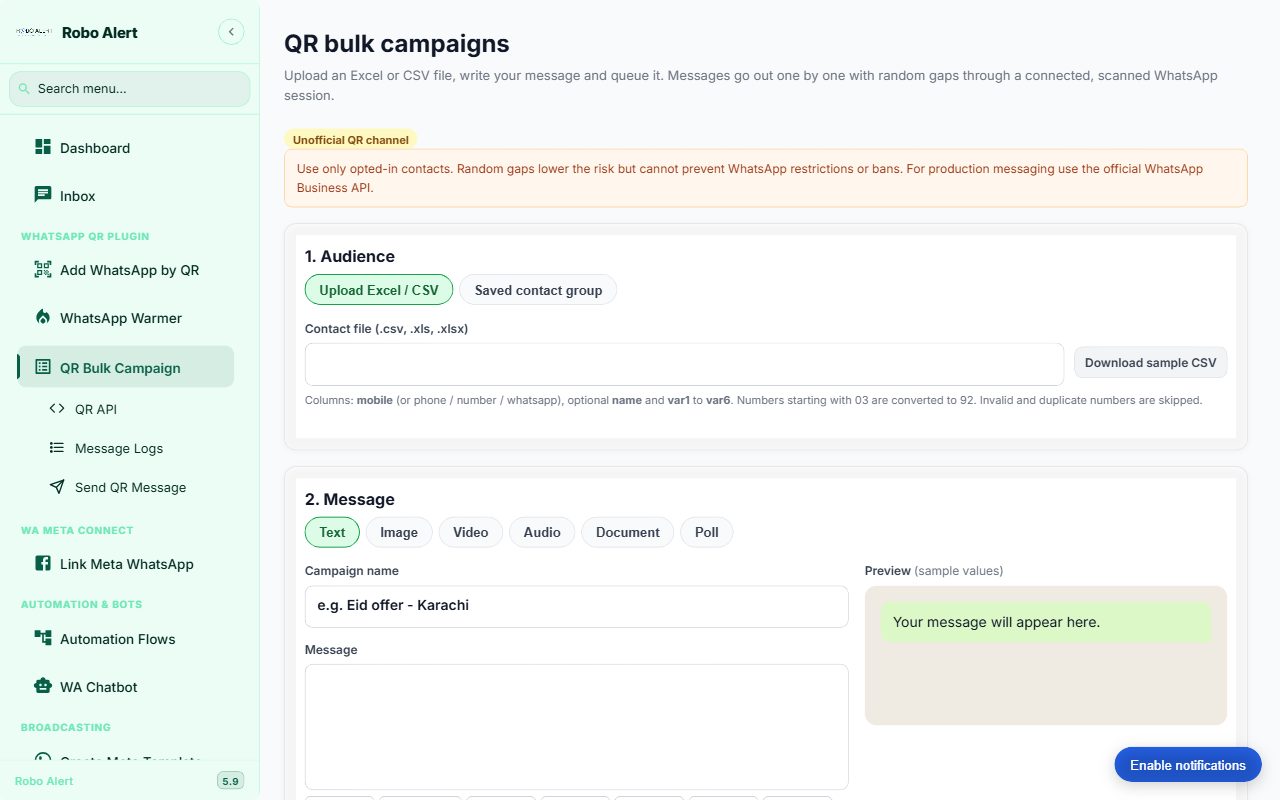
Robo Alert QR bulk campaign screen
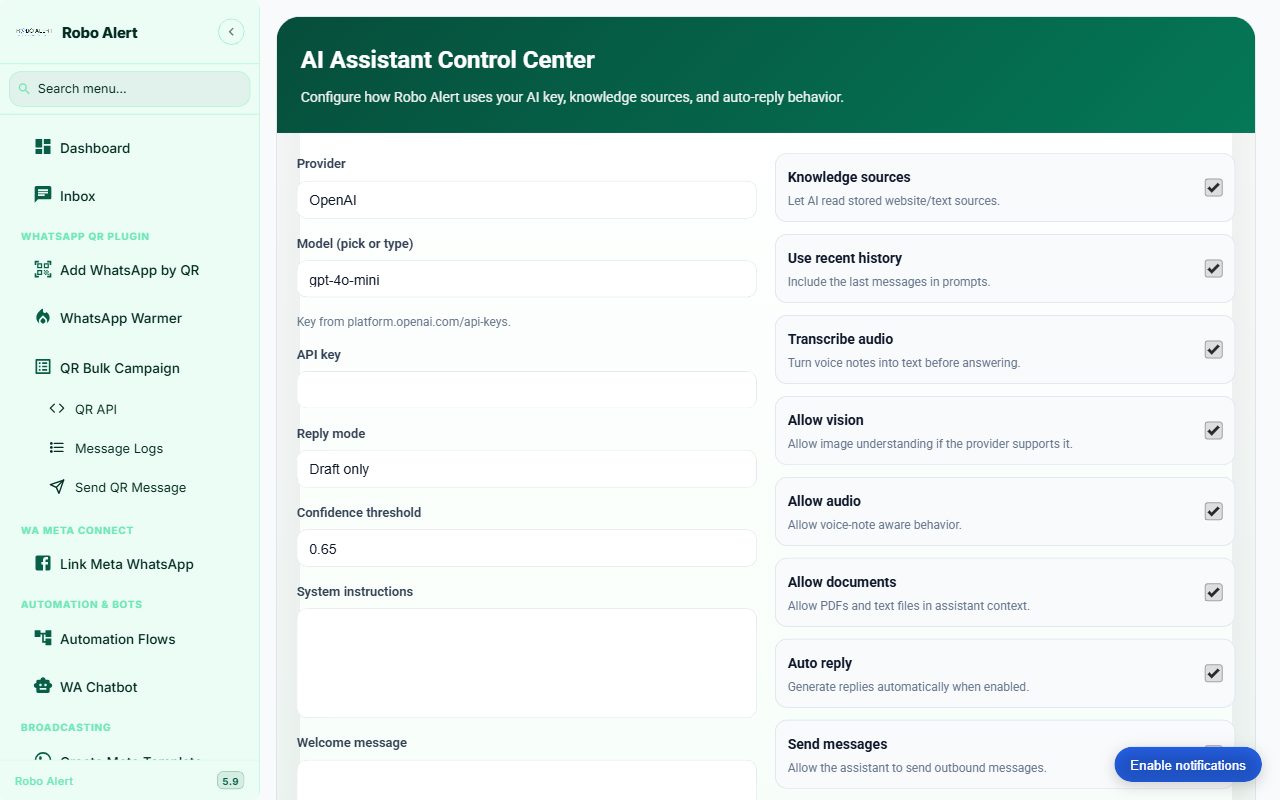
Robo Alert AI Assistant Control Center: provider, model, reply mode, knowledge sources, audio transcription and auto-reply settings

Brands using Robo Alert

  • Client brand logo
  • Client brand logo
  • Client brand logo
  • Client brand logo
  • Client brand logo
  • Client brand logo
  • Client brand logo

Pick your starting point

Two products, one WhatsApp platform

Most stores start with Order Alerts. Teams that sell, support or run campaigns on WhatsApp start with the suite. You can use both.

For online stores

Order Alerts

Every order gets WhatsApp updates automatically, from confirmation to delivery, so buyers stop asking where their parcel is.

  • Order confirmation, shipping, out-for-delivery and delivered alerts
  • Courier updates from 15+ couriers, including PostEx, Trax and TCS
  • Abandoned cart recovery and feedback messages
  • Shopify, WooCommerce or a custom store

For sales, support & marketing teams

Inbox & AI suite

One panel for every WhatsApp conversation: an AI agent that replies and captures leads, flows that run on their own, and campaigns you can schedule.

  • AI agent with your knowledge, in draft, assist or auto-reply mode
  • Lead stages, lead cards to your team group and demo booking
  • Automation flows, keyword replies and a chatbot builder
  • Shared inbox, chat board, bulk campaigns and REST API

Inside the suite

Everything a WhatsApp team needs

These tools are live in the product today at bulk.roboalert.app.

AI agent

Answers customers with your own OpenAI, Gemini or DeepSeek key and your business knowledge. Reads voice notes, images and documents.

Leads

Moves every chat through lead stages, posts lead cards to your team's WhatsApp group and flags chats that need a person.

Automation flows

Drag-and-drop flows and a chatbot builder for menus, keyword replies and follow-ups that run without you.

Shared inbox

All replies in one inbox for the whole team, with tags, notes and a drag-and-drop chat board.

Bulk campaigns

Upload Excel or CSV, personalise with {{name}} and six custom fields, schedule, then resend failures from the logs.

Demo booking

The agent offers free slots and books demos into your Google Calendar, then sends reminders.

REST API

Send WhatsApp messages from your CRM, store or script with an API key.

Webhook automation

Trigger WhatsApp messages from events in your other tools.

WhatsApp warmer

Warm up a new number gradually before you start sending.

AI agent

An agent that answers, qualifies and books

Give it your products, prices and policies. It replies in the customer's language, collects the details your team needs and hands over when a person should step in.

  • You choose the mode: draft only, assist, or full auto-reply, with a confidence threshold.
  • Your knowledge: website and text sources, product details and the media it is allowed to send.
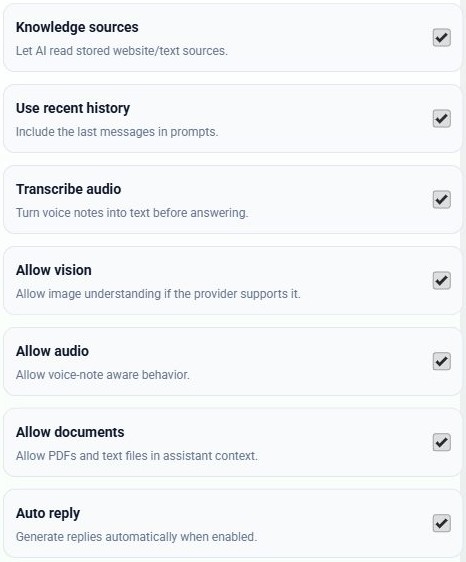
  • Understands more than text: voice notes are transcribed; images and PDFs can be read.
  • Leads and handover: lead stages, lead cards in your team group, follow-ups and opt-out handling.
  • Your keys, your data: AI keys are stored per account.
Try the AI agent free
AI Assistant switches in Robo Alert: knowledge sources, recent history, transcribe audio, allow vision, allow audio, allow documents, auto reply
Real settings from the AI Assistant Control Center

Bulk campaigns

From a spreadsheet to sent, with logs

Upload a contact file, write one message with personal fields, preview it and send now or on a schedule.

  • Columns: mobile, name and var1 to var6
  • Numbers starting with 03 are converted to 92; invalid and duplicate numbers are skipped
  • Text, image, video, audio, document or poll
  • Messages go out one by one with random gaps; failed ones can be resent
More about bulk WhatsApp messaging →
Robo Alert QR bulk campaign screen: upload Excel or CSV, choose message type and preview

Two ways to connect

Scan a QR code, or use the official API

Robo Alert supports both. Pick per number, based on how and how much you send.

QR scan

Link your own WhatsApp number the way WhatsApp Web does. Live in a minute, no templates to approve.

  • Best for order alerts, small opted-in lists and testing
  • Sessions reconnect automatically after a restart
  • Not the official WhatsApp Business API. WhatsApp can restrict numbers that send unwanted messages, so message only people who opted in.

Official Meta WhatsApp API

Connect your WhatsApp Business account through Meta for approved templates and high-volume sending.

  • Best for large audiences and business-critical messages
  • Create Meta templates and run broadcasts from the same panel
  • Same inbox, flows and AI agent as your QR numbers

Order Alerts for stores

Your buyers always know where their order is

Connect your store once. Robo Alert sends the right WhatsApp message at each step of the order journey.

  • Order confirmation the moment an order is placed
  • Shipping, out-for-delivery and delivered alerts from your courier's status
  • Abandoned cart reminders and feedback requests
  • Each order is one credit, however many messages it needs
Start free with 100 orders

Works with 15+ couriers in Pakistan

  • Courier logo
  • Courier logo
  • Courier logo
  • Courier logo
  • Courier logo
  • Courier logo
  • Courier logo
  • Courier logo
  • Courier logo

How it works

Live in three steps

  1. 1

    Create your account

    Start free on Order Alerts or the suite. No credit card needed for the free plans.

  2. 2

    Connect WhatsApp

    Scan the QR code with your phone, or link your official Meta WhatsApp Business account.

  3. 3

    Switch on automation

    Connect your store for order alerts, or set up the AI agent, flows and campaigns. Then watch it work.

Pricing

Plans for each product

Free

For trial

Free

100 Free Orders

  • "Powered by Robo Alert" Branding
  • No Credit Card Needed
  • Courier Integration
  • Scan to Add your Own Device
  • Real Time Dashboard Access
Start free

Starter Plan

For Small Business

Rs 3,000/month

500 Order Credits

  • Scan to Add your Own Device
  • Real Time Dashboard Access
  • Order Update Alerts
  • Real Time Courier Update Alerts
  • One-time setup charges apply
  • Exclusive Support
Choose plan

Growth Plan

For Growing Business

Rs 5,500/month

1000 Order Credits

  • Scan to Add your Own Device
  • Real Time Dashboard Access
  • Order Update Alerts
  • Real Time Courier Update Alerts
  • One-time setup charges apply
  • Exclusive Support
Choose plan

Scale Plan

For Scaling Business

Rs 8,300/month

1500 Order Credits

  • Scan to Add your Own Device
  • Real Time Dashboard Access
  • Order Update Alerts
  • Real Time Courier Update Alerts
  • One-time setup charges apply
  • Exclusive Support
Choose plan

Established Plan

For Established Business

Rs 20,000/month

5000 Order Credits

  • Scan to Add your Own Device
  • Real Time Dashboard Access
  • Order Update Alerts
  • Real Time Courier Update Alerts
  • One-time setup charges apply
  • Exclusive Support
Choose plan

Prices in PKR. One-time setup charges apply on paid plans.

FAQ

Questions, answered

What is Robo Alert?

Robo Alert is a WhatsApp automation platform with two products: Order Alerts, which sends automatic order and delivery updates for online stores, and the Inbox & AI suite at bulk.roboalert.app, with a shared inbox, AI agent, automation flows, bulk campaigns and a REST API.

Which product should I start with?

If you run a Shopify, WooCommerce or custom store and want buyers to get order, shipping and delivery updates, start with Order Alerts. If your team sells, supports or runs campaigns on WhatsApp, start with the Inbox & AI suite. Many businesses use both.

How do I connect WhatsApp?

Scan a QR code with your phone to link your own number, or connect the official Meta WhatsApp Business API. The QR option needs no business account or template approval.

Is the QR connection the official WhatsApp API?

No. The QR channel links your own number the way WhatsApp Web does. WhatsApp can restrict numbers that send unwanted messages, so message only people who opted in and keep volumes sensible. For large or business-critical sending, use the official Meta WhatsApp API, which the platform also supports.

Can the AI agent reply to customers automatically?

Yes, using your own OpenAI, Gemini or DeepSeek key. You choose the reply mode: draft only, assist or auto-reply. We recommend starting in draft mode and reviewing answers before switching on auto-reply.

How does lead capture work?

The AI agent collects the details you ask for, moves each chat through lead stages and can post lead cards to your team's WhatsApp group. It can also offer demo slots and book them into your Google Calendar.

Can I send campaigns from an Excel file?

Yes. In the suite, upload an .xlsx, .xls or .csv file with a mobile column, optionally name and var1 to var6, write your message and send now or on a schedule. Invalid and duplicate numbers are skipped.

Which stores and couriers does Order Alerts work with?

Shopify, WooCommerce and custom stores, plus 15+ couriers in Pakistan, including PostEx, Trax and TCS.

How is Order Alerts charged?

Each order uses one credit, however many messages it needs. The free plan includes 100 orders with Robo Alert branding and no credit card. Paid plans remove the branding.

Is there a free plan?

Yes. Order Alerts includes 100 free orders, and the Inbox & AI suite has a free trial.

Do I need coding skills?

No. Both products are set up from the dashboard. Developers can use the REST API and webhooks if they want to connect other systems.

Where can I get support?

Message us on WhatsApp at +92 334 111 7626 or email [email protected]. Tutorials and setup guides are available in the dashboard.

Start automating WhatsApp today

Free to start. Talk to us on WhatsApp if you are not sure which product fits.